In-App Notifications
In-app notifications are displayed directly within the platform — no email required. They appear in real time while you are logged in.
Accessing Notifications
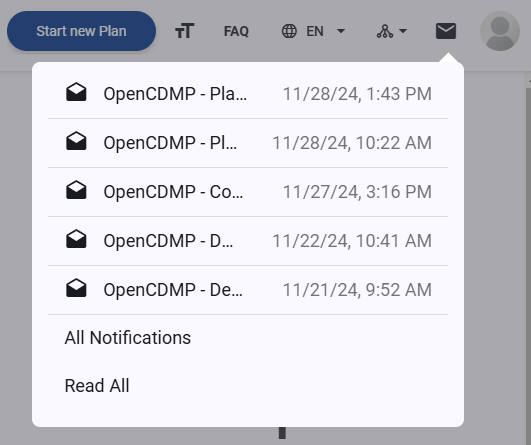
Click the notifications icon (bell) at the top right of the navigation bar, next to your profile picture.

A dropdown appears showing your most recent unread notifications. From here you can:
- Read individual notifications — click any entry to navigate directly to the relevant plan or description.
- Mark all as read — click
Read allto clear all unread indicators at once. - View all notifications — click
All notificationsto open the full notifications table with your complete history.
What Triggers an In-App Notification
The following events can generate in-app notifications:
| Event | Description |
|---|---|
| Plan invitation | You were invited to collaborate on a plan |
| Plan status changed | A plan you are involved in changed status |
| Plan finalized | A plan you are involved in was finalized |
| Plan modified | A plan you are involved in was updated |
| Plan deposited | A plan you are involved in was deposited to a repository and received a DOI |
| Plan evaluation completed | An evaluation was run on a plan you are involved in |
| Plan access removed | Your access to a plan was removed |
| Your role changed | Your role on a plan was changed |
| Annotation created | A comment was added to a plan or description you are involved in |
| Annotation status changed | A comment's status was updated |
| Mentioned in annotation | You were @-mentioned in a comment |
| Description created | A description was added to a plan you are involved in |
| Description status changed | A description you are involved in changed status |
| Description finalized | A description you are involved in was finalized |
| Description evaluation completed | An evaluation was run on a description you are involved in |
| Account merge confirmation | A request to link accounts was initiated |
| Credential removal confirmation | A request to unlink an email was initiated |
info
Which of these events generate in-app notifications depends on the notification templates configured by your administrator. Users can further control their preferences in Profile Settings.